Welcome to the Melanie AI Promptinator guide—your one-page how-to on turning prompt text into a live form. No heavy JavaScript frameworks, just simple “shortcodes” that map to form controls. Here’s everything you need to know, in the order you’ll typically use them:
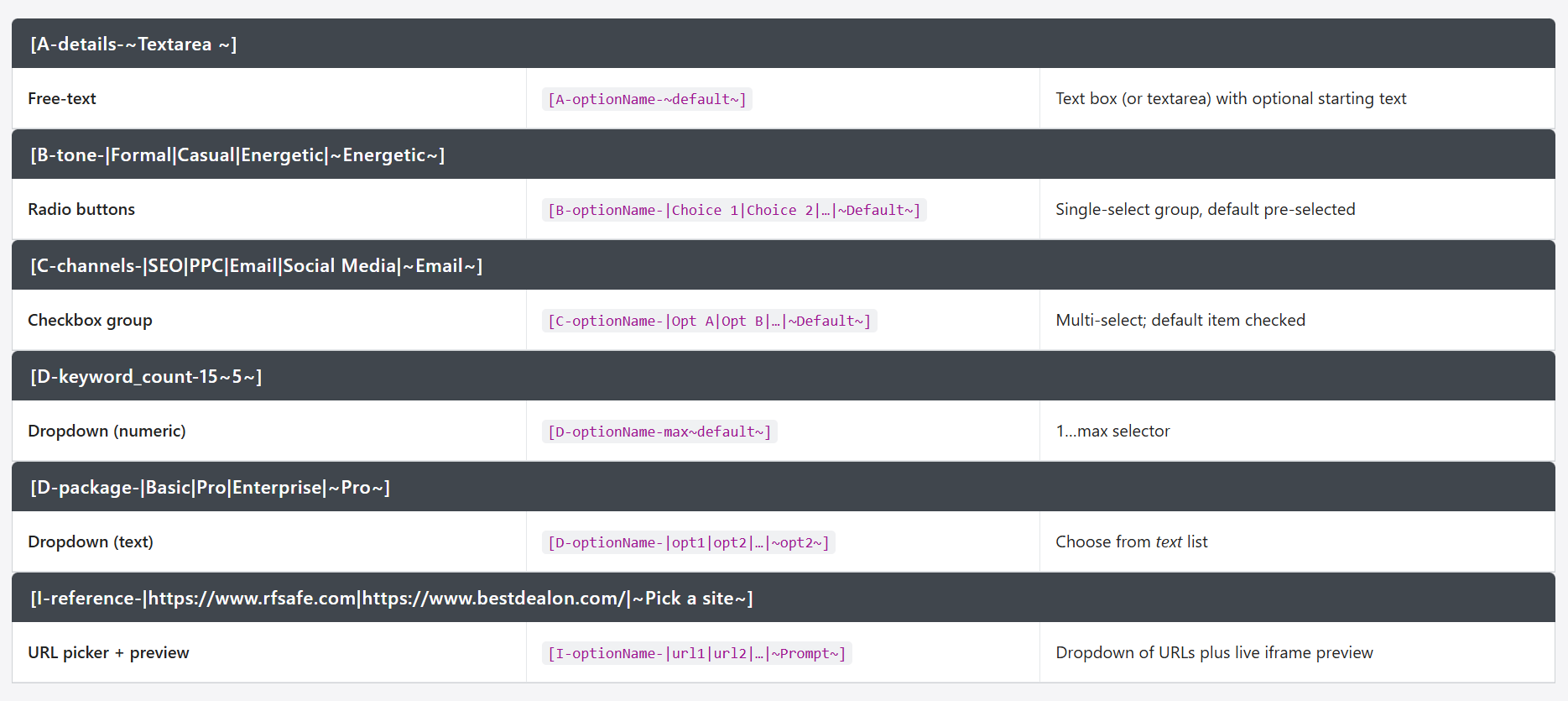
| [A-details-~Textarea ~] | [B-tone-|Formal|Casual|Energetic|~Energetic~] | [C-channels-|SEO|PPC|Email|Social Media|~Email~] |
|---|---|---|
| Free-text | Radio buttons | Checkbox group |
[A-optionName-~default~] |
[B-optionName-|Choice 1|Choice 2|…|~Default~] |
[C-optionName-|Opt A|Opt B|…|~Default~] |
| Text box (or textarea) with optional starting text | Single-select group, default pre-selected | Multi-select; default item checked |
| [D-keyword_count-15~5~] | [D-package-|Basic|Pro|Enterprise|~Pro~] | [I-reference-|https://www.rfsafe.com|https://www.bestdealon.com/|~Pick a site~] |
|---|---|---|
| Dropdown (numeric) | Dropdown (text) | URL picker + preview |
[D-optionName-max~default~] |
[D-optionName-|opt1|opt2|…|~opt2~] |
[I-optionName-|url1|url2|…|~Prompt~] |
| 1…max selector | Choose from text list | Dropdown of URLs plus live iframe preview |
Business Fields (fully dynamic)
These pull directly from your business profile—no options to configure:
-
[name] -
[slogan] -
[description] -
[address] -
[city] -
[state] -
[zip] -
[phone] -
[website] -
[email]
Business Checkboxes (dynamic)
Automatically list your tags for services or areas:
-
[C-service-]→ your service tags -
[C-location-]→ your location tags
Static Form Elements Making Prompts Dynamic
For everything else you choose the optionName—an identifier you invent—then supply choices or defaults.
Text Input
[A-optionName-~default text~]
Example: [A-offer_details-~Enter your special deal here…~]
Renders a text field or textarea pre-filled with your prompt.
Radio Buttons
[B-optionName-|Choice 1|Choice 2|…|~Default~]
Example: [B-tone-|Formal|Casual|Energetic|~Energetic~]
Renders a set of radio buttons; Energetic is selected by default.
Checkbox Group
[C-optionName-|Opt A|Opt B|…|~Default Opt~]
Example: [C-channels-|SEO|PPC|Email|Social Media|~Email~]
Renders multiple checkboxes; Email checked by default.
Dropdowns
-
Numeric:
[D-optionName-max~default~]
Example: [D-keyword_count-15~5~] → select 1…15, default 5 -
Text:
[D-optionName-|opt1|opt2|…|~opt2~]
Example: [D-package-|Basic Plan|Pro Plan|Enterprise Plan|~Pro Plan~] → Select Pro by default
URL Picker + Iframe
[I-optionName-|https://site1.com|https://site2.com|~Default Prompt~]
Example:[I-visit_site-|https://en.wikipedia.org/wiki/Bedtime_story|https://www.gutenberg.org/|~Pick a site~]
Renders a dropdown of URLs and an inline preview of the selected page.
Melanie AI Promptinator — Quick-Reference Grid
| Category | Syntax | What it pulls / renders | Example |
|---|---|---|---|
| Business Fields (auto-filled) | [name] [slogan] [description] [address] [city] [state] [zip] [phone] [website] [email] |
Instantly inserts data from your stored business profile | — |
| Business Checkboxes | [C-service-] / [C-location-] |
Creates checkbox lists from your saved service and location tags | — |
| Free-text | [A-optionName-~default~] |
Text box (or textarea) with optional starting text | [A-offer_details-~Winter special 10 % off~] |
| Radio buttons | [B-optionName-|Choice 1|Choice 2|…|~Default~] |
Single-select group, default pre-selected | [B-tone-|Formal|Casual|Energetic|~Energetic~] |
| Checkbox group | [C-optionName-|Opt A|Opt B|…|~Default~] |
Multi-select; default item checked | [C-channels-|SEO|PPC|Email|Social Media|~Email~] |
| Dropdown (numeric) | [D-optionName-max~default~] |
1…max selector | [D-keyword_count-15~5~] |
| Dropdown (text) | [D-optionName-|opt1|opt2|…|~opt2~] |
Choose from text list | [D-package-|Basic|Pro|Enterprise|~Pro~] |
| URL picker + preview | [I-optionName-|url1|url2|…|~Prompt~] |
Dropdown of URLs plus live iframe preview | [I-reference-|https://www.rfsafe.com|https://www.bestdealon.com/|~Pick a site~] |
(Everything above fits in one screenshot-friendly table—no bulky HTML required.)
| [A-details-~Textarea~] | [B-tone-|Formal|Casual|Energetic|~Energetic~] | [C-channels-|SEO|PPC|Email|Social Media|~Email~] |
|---|---|---|
| [D-keyword_count-15~5~] | [D-package-|Basic|Pro|Enterprise|~Pro~] | [I-reference-|https://www.rfsafe.com|https://www.bestdealon.com/|~Pick a site~] |
| Free-text Dropdown (numeric) |
Radio buttons Dropdown (text) |
Checkbox group URL picker + preview |
[A-optionName-~default~][D-optionName-max~default~] |
[B-optionName-|Choice 1|Choice 2|…|~Default~][D-optionName-|opt1|opt2|…|~opt2~] |
[C-optionName-|Opt A|Opt B|…|~Default~][I-optionName-|url1|url2|…|~Prompt~] |
| Text box (or textarea) with optional starting text 1…max selector |
Single-select group, default pre-selected Choose from text list |
Multi-select; default item checked Dropdown of URLs plus live iframe preview |
| [A-details-~Textarea ~] | [B-tone-|Formal|Casual|Energetic|~Energetic~] | [C-channels-|SEO|PPC|Email|Social Media|~Email~] |
|---|---|---|
| Free-text | Radio buttons | Checkbox group |
[A-optionName-~default~] |
[B-optionName-|Choice 1|Choice 2|…|~Default~] |
[C-optionName-|Opt A|Opt B|…|~Default~] |
| Text box (or textarea) with optional starting text | Single-select group, default pre-selected | Multi-select; default item checked |